
Your home lab, shared and reachable from anywhere
Pangolin is a free, self-hosted reverse proxy and VPN in one. Share apps with friends and family, and reach everything else in your lab from anywhere, without opening a single port at home.




Share self-hosted apps with friends and family
Publish Jellyfin, Immich, Nextcloud, and anything else with a web UI on your own domain. Pangolin tunnels traffic to your lab and checks who’s asking before a request ever reaches the app.
Your domain, automatic SSL
Serve apps at photos.yourdomain.com with certificates issued and renewed for you.
Share with just a link
Send a link that grants access to a single app. No account to create, no app to install, and you can revoke it anytime.
Nothing exposed at home
Your lab connects outbound, so it works behind CGNAT and dynamic IPs with no port forwarding.
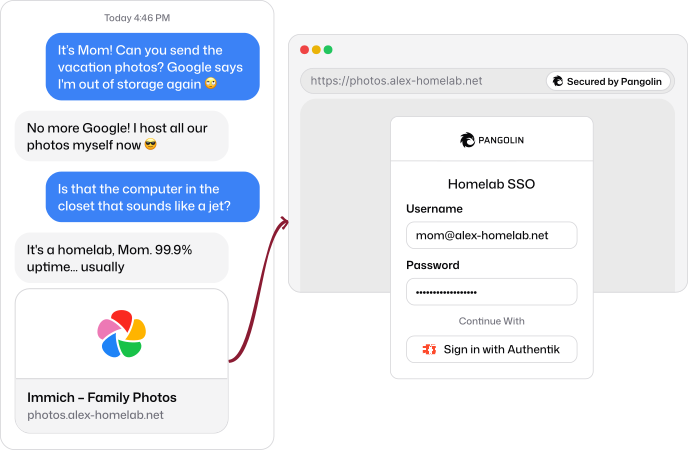
Get access to the self-hosted apps you already love
Media servers, photo libraries, file sync, notes, passwords, and automations. If it has a web UI or a port, Pangolin can put it behind a login on your domain.
 Jellyfin
 Plex
 Emby
 Audiobookshelf
 Immich
 Nextcloud
 Syncthing
 File Browser
 Obsidian
 Bitwarden
 GitLab
 n8n
Authentication in front of every app
Single sign-on for your home lab. Everyone signs in once and reaches only the apps you’ve shared with them, even apps that don’t have a login of their own.
Single sign-on
Use built-in users or connect the identity provider you already self-host, like Authentik or Pocket ID.
PIN codes and passcodes
Give the family one easy code for the media server instead of another password.
Email codes
Let specific people sign in with a one-time code sent to their email.
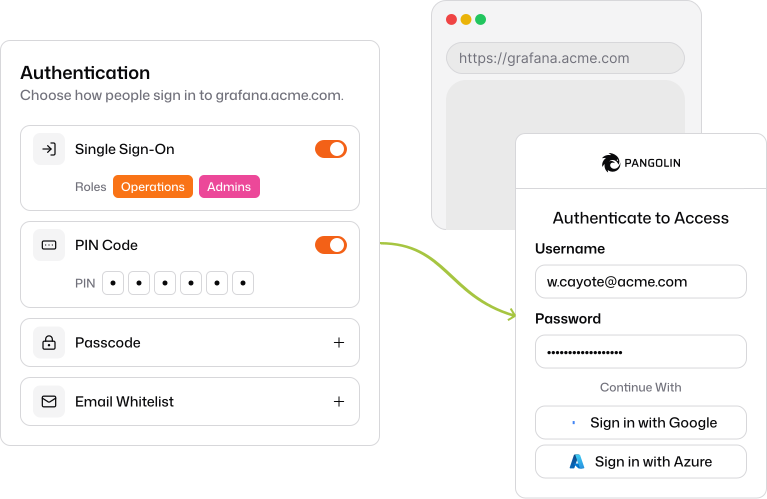
Sign in with the identity provider you already self-host
Connect any OIDC provider for single sign-on across every app, free with an Enterprise Edition personal license.
 Authentik
 Pocket ID
 Keycloak
 Authelia
Geoblocking, rules, and analytics
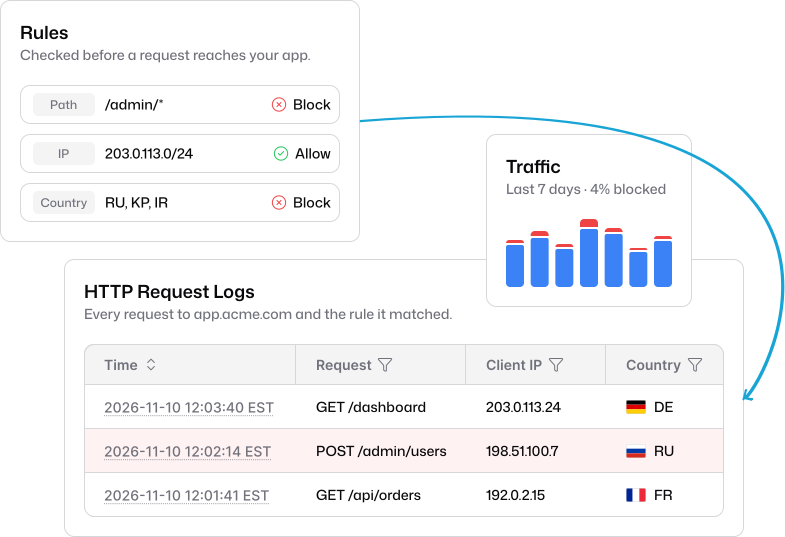
Keep bots and strangers away from your lab. Decide who gets through before a request ever reaches your app, and see exactly who’s knocking.
Geoblocking
Allow only the countries your friends and family are in, and block everyone else.
Rules by IP and path
Allow or deny requests by IP, CIDR, or path, like locking /admin to your home network.
Request logs and analytics
See every request, where it came from, and what was blocked.
Connect to your home lab remotely
Install the Pangolin client on your laptop or phone and reach your lab like you’re on the couch. SSH, the Proxmox UI, your NAS, and file shares stay private to you.
A VPN built on WireGuard®
Clients connect peer-to-peer with NAT traversal, falling back to an encrypted relay only when needed.
Hosts, ranges, and friendly names
Grant a single host or your whole subnet, and reach it as nas.home instead of an IP.
Every platform
Clients for macOS, Windows, Linux, iOS, and Android.
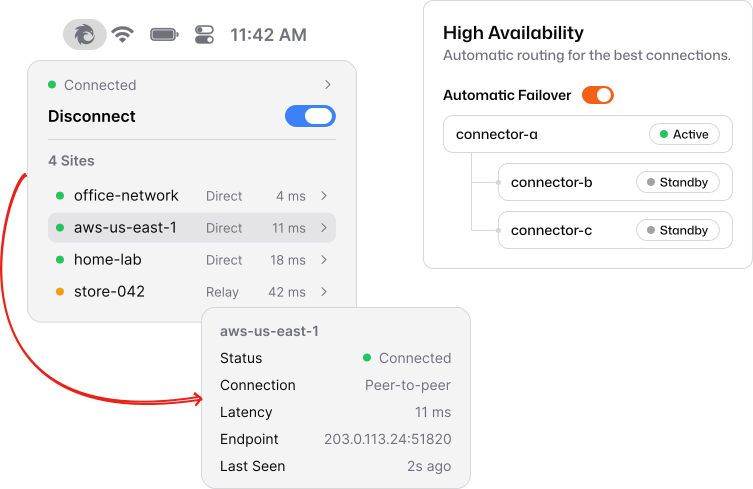
Deploy anywhere your lab runs
Run the connector as a container or a binary on the NAS, hypervisor, or tiny computer you already have.
 Unraid
 TrueNAS
 Proxmox
 Synology
 Raspberry Pi
 Docker
 Coolify
 Home Assistant
Self-hosted, open source, and free
Run your own private VPN and reverse proxy on a server you control. Your traffic never passes through anyone else’s infrastructure.

Open source Community Edition
The core is free and open source under AGPLv3, and the code is on GitHub.

Enterprise Edition, free for personal use
Unlock SSO, roles, and audit logs in your home lab at no cost with a free personal license.

Runs on hardware you already have
Connect your lab from Docker, Unraid, Linux, a NAS, or a Raspberry Pi.
Install in one command
Run the installer on any small Linux VPS. It sets up Pangolin, the WireGuard® server, and the reverse proxy with Docker, and walks you through the rest.
curl -fsSL https://static.pangolin.net/get-installer.sh | bash- 1
Get a small server
Any Linux VPS with a public IP and a domain pointed at it. AMD64 and ARM64 both work.
- 2
Run the installer
Paste the command above, answer a few prompts, and the dashboard is live with SSL.
- 3
Connect your home lab
Add a site and run the connector on your home server, NAS, Unraid box, or Raspberry Pi.
- 4
Publish and share
Add your apps as resources, choose who can reach them, and send the link.
From home lab creators
Walkthroughs and reviews from the community: installs, comparisons, and full lab setups with Pangolin.

Home lab FAQ
Is Pangolin free for home labs?


Yes. Self-hosted Community Edition is free and open source under AGPLv3. Self-hosted Enterprise Edition is also free for personal use, so you can run every feature in your home lab at no cost.
If you'd rather not run the server yourself, Pangolin Cloud Basic is free for up to 5 users and 5 sites.
Is the Enterprise Edition free for personal use?
Yes. Self-hosted Enterprise Edition is free for personal, non-commercial use, such as home labs, personal learning, and hobby projects. It adds features like single sign-on with your own identity provider, role-based access, and audit logs on top of Community Edition.
To get a free key, create a Pangolin Cloud account, create an organization, and complete the license application under Billing & Licenses. See Personal Use in the docs, and the Fossorial Commercial License for the full terms.
Do I need to open ports on my home router?
No. The site connector in your home lab makes an outbound WireGuard® tunnel to your Pangolin server, so nothing at home accepts connections from the internet. There's no port forwarding and no public IP to expose.
Does it work behind CGNAT, Starlink, or a dynamic IP?
Yes. Because the connector at home dials out, Pangolin works behind carrier-grade NAT, satellite and mobile connections, and home IP addresses that change.
What do I need to self-host Pangolin?
A Linux server with a public IP (a small VPS is plenty), a domain pointed at it, and TCP ports 80 and 443 plus UDP ports 51820 and 21820 open on that server. The installer supports both AMD64 and ARM64.
See Choosing a VPS and the quick install guide.
Do my friends and family need to install anything?
Not for apps you publish on your domain. They open the app in a browser and sign in, enter a PIN or passcode, or follow a share link you send them. Only private resources, like SSH or a file share, need the Pangolin client.
What can I run the connector on in my home lab?
The site connector runs on Linux, macOS, and Windows, in Docker or Docker Compose, on Kubernetes, and on Unraid. That covers most home servers, NAS boxes, mini PCs, and Raspberry Pis. See the install page for every option.
What's the difference between public and private resources?
Public resources go through Pangolin's reverse proxy on your own domain, with SSL and authentication in front. They're best for apps you share, like Jellyfin, Immich, or Nextcloud. Private resources are reached through the Pangolin client like a VPN. They're best for things only you should touch, like SSH, the Proxmox UI, or SMB shares.
Explore other use cases
Remote Access
Identity-based access to private apps, servers, and networks.
Business VPN
Replace your legacy VPN with zero trust built on WireGuard®.
Reverse Proxy
Publish internal apps behind identity, without opening ports.
Securing AI
Identity-aware access to cloud and self-hosted models.
Zero Trust & Identity
Identity providers, roles, privileged access, and audit.
Privileged Access
Just-in-time SSH, browser RDP and VNC, and session logs.